
源码文件 >>> 日志悬浮窗源码(含使用示例)
积分签到即可搞定。
更新说明
- 2024年05月24日
- 修复报错:com.stardust.autojs.runtime.api.Floaty$JsRawWindow.setPosition(org.mozilla.javascript.Undefined,org.mozilla.javascript.Undefined).
环境
- AutojsPro 9.3.11
简单介绍
- 悬浮窗正常穿透,支持安卓12
- 改成类形式
- 支持单例模式,方便分模块使用
- 支持移动
- …
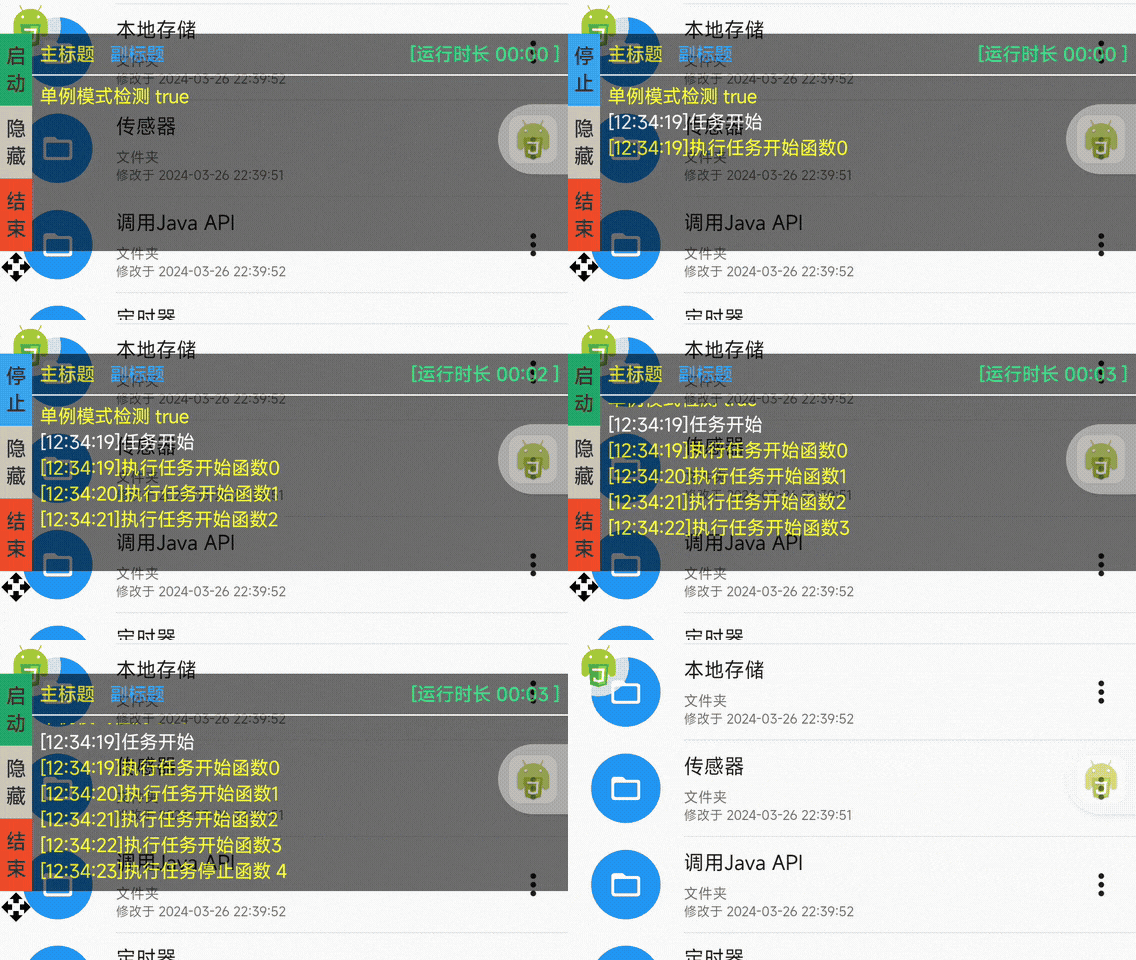
源码
[content_hide]
var LogFloatWindow = /** @class */ (function () {
  function LogFloatWindow(y) {
    this.x = 0;
    this.y = y || device.height * 0.6;
    this.workThread = $threads.start(function () {});
    this.storage = $storages.create('floatLogWindow');
    this.onStart = null;
    this.onStop = null;
  }
  LogFloatWindow.prototype.init = function () {
    var _this = this;
    this.floatyLogW = $floaty.rawWindow(
      '<card id="root" h="150" cardBackgroundColor="#b3000000" cardElevation="0" cardCornerRadius="0" gravity="center_vertical">\n        <vertical id="layout" marginLeft="22">\n          <horizontal w="*" margin="5">\n            <horizontal h="auto" w="0" layout_weight="1">\n              <text id="title" text="" textSize="13dp" textColor="#FFD700" textStyle="bold" maxLines="1" ellipsize="end" style="Widget/AppCompat.Button.Borderless" />\n              <text id="label" text="" textSize="13dp" textColor="#1E90FF" textStyle="bold" maxLines="1" ellipsize="end" style="Widget/AppCompat.Button.Borderless" marginLeft="10" />\n            </horizontal>\n            <Chronometer id="runTime" textSize="13dp" textColor="#03D96A" style="Widget/AppCompat.Button.Borderless" textStyle="bold" />\n          </horizontal>\n          <button gravity="center_horizontal" textColor="#DC143C" bg="#FFF5EE" h="1" padding="0" margin="0" textStyle="bold" />\n          <console id="console" w="*" h="*" padding="5" />\n        </vertical>\n      </card>'
    );
    this.controller = floaty.rawWindow(
      '<vertical>\n        <vertical h="150" id="main">\n          <text layout_weight="5" id="start" textStyle="bold" gravity="center" w="22dp" text="\u542F\u52A8" textColor="#333333" bg="#00a86b" />\n          <text layout_weight="5" id="hideLog" textStyle="bold" gravity="center" w="22dp" text="\u65E5\u5FD7" textColor="#333333" bg="#FF8E12" />\n          <text layout_weight="5" id="stop" textStyle="bold" gravity="center" w="22dp" text="\u7ED3\u675F" textColor="#333333" bg="#ee4d2d" />\n        </vertical>\n        <img id="move" src="@drawable/ic_open_with_black_48dp" w="22dp" h="22dp" />\n      </vertical>'
    );
    this.logButton = this.controller.hideLog;
    this.startButton = this.controller.start;
    this.stopButton = this.controller.stop;
    this.runTimeView = this.floatyLogW.runTime;
    ui.post(function () {
      // 将alpha设置为最大遮挡不透明度
      try {
        // _this.floatyLogW.main.getRootView().getLayoutParams().alpha = 0.8;
        _this.floatyLogW.main.getRootView().setAlpha(0.8);
      } catch (error) {}
      _this.floatyLogW.setTouchable(false);

      _this.runTimeView.setFormat('[运行时长 %s ]');
      _this.runTimeView.setBase(android.os.SystemClock.elapsedRealtime());
      var floatConsole = _this.floatyLogW.console;
      floatConsole.setConsole(runtime.console); // 设置控制台
      floatConsole.setInputEnabled(false); // 控制台输入框禁用
      floatConsole.setColor('V', '#ffff00');
      floatConsole.setColor('I', '#ffffff');
      floatConsole.setColor('D', '#ffff00');
      floatConsole.setColor('W', '#673ab7');
      floatConsole.setColor('E', '#ff0000');
      floatConsole.setTextSize(13);
      _this.floatyLogW.setSize(-1, -2);
      _this.floatyLogW.setPosition(_this.storage.get('floatLogWindowX', _this.x), _this.storage.get('floatLogWindowY', _this.y));
      // this.floatyLogW?.setPosition(3000, 3000); // 隐藏到屏幕外
      _this.controller.setTouchable(true);
      _this.controller.setPosition(_this.storage.get('floatLogWindowX', _this.x), _this.storage.get('floatLogWindowY', _this.y));
      _this.logButton.setText('隐藏');
      _this.logButton.attr('background', '#d1c7b7');

      _this.controller.move.setOnTouchListener(
        new android.view.View.OnTouchListener({
          onTouch: function onTouch(view, event) {
            switch (event.getAction()) {
              case android.view.MotionEvent.ACTION_DOWN:
                _this.touchX = event.getRawX();
                _this.touchY = event.getRawY();
                _this.windowX = _this.controller.getX();
                _this.windowY = _this.controller.getY();
                _this.downTime = new Date().getTime();
                return true;
              case android.view.MotionEvent.ACTION_MOVE:
                // 如果按下的时间超过1秒判断为长按,调整悬浮窗位置
                if (_this.downTime && _this.windowY && _this.touchY) {
                  if (new Date().getTime() - _this.downTime > 1000) {
                    var x = _this.x;
                    var y = _this.windowY + (event.getRawY() - _this.touchY);
                    _this.storage.put('floatLogWindowX', x);
                    _this.storage.put('floatLogWindowY', y);
                    // 移动手指时调整悬浮窗位置
                    _this.controller.setPosition(x, y);
                    _this.floatyLogW.setPosition(x, y);
                  }
                }
                break;
              case android.view.MotionEvent.ACTION_UP:
                // 手指弹起时如果偏移很小则判断为点击
                if (Math.abs(event.getRawY() - _this.touchY) < 5 && Math.abs(event.getRawX() - _this.touchX) < 5) {
                }
                break;
              default:
                break;
            }
            return true;
          },
        })
      );
      _this.startButton.setOnClickListener(
        new android.view.View.OnClickListener({
          onClick: function onClick() {
            return _this.handleStart(_this);
          },
        })
      );
      _this.stopButton.setOnClickListener(
        new android.view.View.OnClickListener({
          onClick: function onClick() {
            return _this.handleStop(_this);
          },
        })
      );
      _this.logButton.setOnClickListener(
        new android.view.View.OnClickListener({
          onClick: function onClick() {
            return _this.handleLog(_this);
          },
        })
      );
    });
  };
  /**
   * 获取 LogFloatWindow 的单一实例
   * @returns LogFloatWindow 的单一实例
   */
  LogFloatWindow.getInstance = function () {
    if (!LogFloatWindow.instance) {
      // 如果实例不存在,则创建一个新的实例
      LogFloatWindow.instance = new LogFloatWindow();
    }
    // 返回 LogFloatWindow 的单一实例
    return LogFloatWindow.instance;
  };
  LogFloatWindow.prototype.handleStop = function (_this) {
    $app.launchPackage(context.getPackageName()); // 返回脚本应用界面
    toast('停止本次任务');
    if (_this.workThread) {
      _this.workThread.interrupt();
    }
    _this.floatyLogW.close();
    _this.controller.close();
    $threads.shutDownAll();
  };
  LogFloatWindow.prototype.handleLog = function (_this) {
    var x = _this.storage.get('floatLogWindowX', 0);
    var y = _this.storage.get('floatLogWindowY', device.height * 0.6);
    if (_this.logButton.attr('text') == '隐藏') {
      ui.post(function () {
        _this.floatyLogW.setPosition(3000, 3000);
        _this.logButton.attr('text', '日志');
        _this.logButton.attr('background', '#FF8E12');
      });
    } else if (_this.logButton.attr('text') == '日志') {
      ui.post(function () {
        _this.logButton.setText('隐藏');
        _this.logButton.attr('background', '#d1c7b7');
        _this.floatyLogW.setPosition(x, y);
      });
    }
  };
  LogFloatWindow.prototype.handleStart = function (_this) {
    toast('开始本次任务');
    if (_this.workThread ? !_this.workThread.isAlive() : true) {
      //线程没有运行
      if (_this.controller) _this.toggleStatus(true);
      //新建一个线程,赋值给变量_thread
      _this.workThread = threads.start(function () {
        try {
          _this.info('任务开始');
          _this.onStart && _this.onStart();
          if (_this.controller) _this.toggleStatus(false);
          _this.info('任务完成');
        } catch (e) {
          var info = $debug.getStackTrace(e);
          if (info.includes('com.stardust.autojs.runtime.exception.ScriptInterruptedException')) {
            _this.info('停止任务');
          } else {
            _this.error('任务报错: '.concat(e));
            _this.error('程序运行失败' + info);
          }
          // _this.log("程序运行失败>>打开软件右上角>>查看日志");
          _this.toggleStatus(false);
        }
        //运行完毕修改按钮文字
        _this.toggleStatus(false);
      });
    } else {
      _this.onStop && _this.onStop();
      _this.toggleStatus(false);
      //线程正在运行
      _this.workThread && _this.workThread.interrupt();
      //中断线程;
    }
  };

  LogFloatWindow.prototype.dateFormat = function (date, fmt_str) {
    return new java.text.SimpleDateFormat(fmt_str).format(new Date(date || new Date()));
  };
  LogFloatWindow.prototype.info = function (msg) {
    console.info('['.concat((0, this.dateFormat)(new Date(), 'HH:mm:ss'), ']').concat(msg));
  };
  LogFloatWindow.prototype.log = function (msg) {
    console.log('['.concat((0, this.dateFormat)(new Date(), 'HH:mm:ss'), ']').concat(msg));
  };
  LogFloatWindow.prototype.error = function (msg) {
    console.error('['.concat((0, this.dateFormat)(new Date(), 'HH:mm:ss'), ']').concat(msg));
  };
  /**
   * 设置日志悬浮窗标题
   * @param title 标题字符串
   */
  LogFloatWindow.prototype.setFloatyTitle = function (title) {
    var _this = this;
    ui.run(function () {
      _this.floatyLogW.title.attr('text', title);
    });
  };
  /**
   * 设置日志悬浮窗标签
   * @param label 标签字符串
   */
  LogFloatWindow.prototype.setFloatySubTitle = function (label) {
    var _this = this;
    ui.run(function () {
      _this.floatyLogW.label.attr('text', label);
    });
  };
  /**
   * 切换状态(启用/停用)
   * @param enabled 是否启用
   */
  LogFloatWindow.prototype.toggleStatus = function (enabled) {
    var _this = this;
    $ui.post(function () {
      if (_this.floatyLogW && _this.controller && _this.runTimeView && _this.startButton) {
        if (enabled) {
          // 已启动
          _this.runTimeView.setBase(android.os.SystemClock.elapsedRealtime());
          _this.runTimeView.start();
          _this.startButton.setText('停止');
          _this.startButton.attr('background', '#05a7f4');
        } else {
          // 未启动
          _this.runTimeView.stop();
          _this.startButton.setText('启动');
          _this.startButton.attr('background', '#00a86b');
        }
      }
    });
  };
  return LogFloatWindow;
})();[/content_hide]
谢谢分享
好东西。谢谢老大。么么哒
[g=dabing][g=dabing][g=dabing]
谢谢分享~~~~~
学习学习,感谢分享
来学习了
恢复看看
学习学习,感谢分享
学一些
[code]
JavaException: java.lang.NullPointerException: Attempt to invoke virtual method ‘com.stardust.autojs.runtime.ScriptRuntime com.stardust.autojs.engine.RhinoJavaScriptEngine.getRuntime()’ on a null object reference (/android_asset/modules/__ui__.js#98)
JavaException: java.lang.NullPointerException: Attempt to invoke virtual method ‘com.stardust.autojs.runtime.ScriptRuntime com.stardust.autojs.engine.RhinoJavaScriptEngine.getRuntime()’ on a null object reference
[/code]